Pregnant Guide - Baby Tracker
- 2.6
- Rating
- 100.00K
- Installs
- Free
- Price

 Analysis by App-foxy
I spent time with Pregnant Guide - Baby Tracker as a simple pregnancy companion, and my first impression was clear: this is aimed at people who want a straightforward way to follow pregnancy progress rather than a large, feature-heavy health platform. Developed by SVVN-RU, it sits in the parenting category and focuses on the everyday questions many expectant parents ask, especially how far along the pregnancy is, how the baby is developing by week, and how much time remains before the due date.
The app is free to use, which makes it easy to try without making a financial commitment. It is also marked for Everyone, runs on Android 7.0 and later, and currently appears as version 1.0.7. Its audience is already fairly broad, with over one hundred thousand installs, although the average rating is 2.6 from around one hundred sixty ratings. I would not ignore that rating, but I also would not treat it as the whole story. A pregnancy tracker can be useful for one person and disappointing for another, depending on whether they want a calm weekly reference or a detailed medical organizer.
How Pregnant Guide works as a weekly pregnancy companion
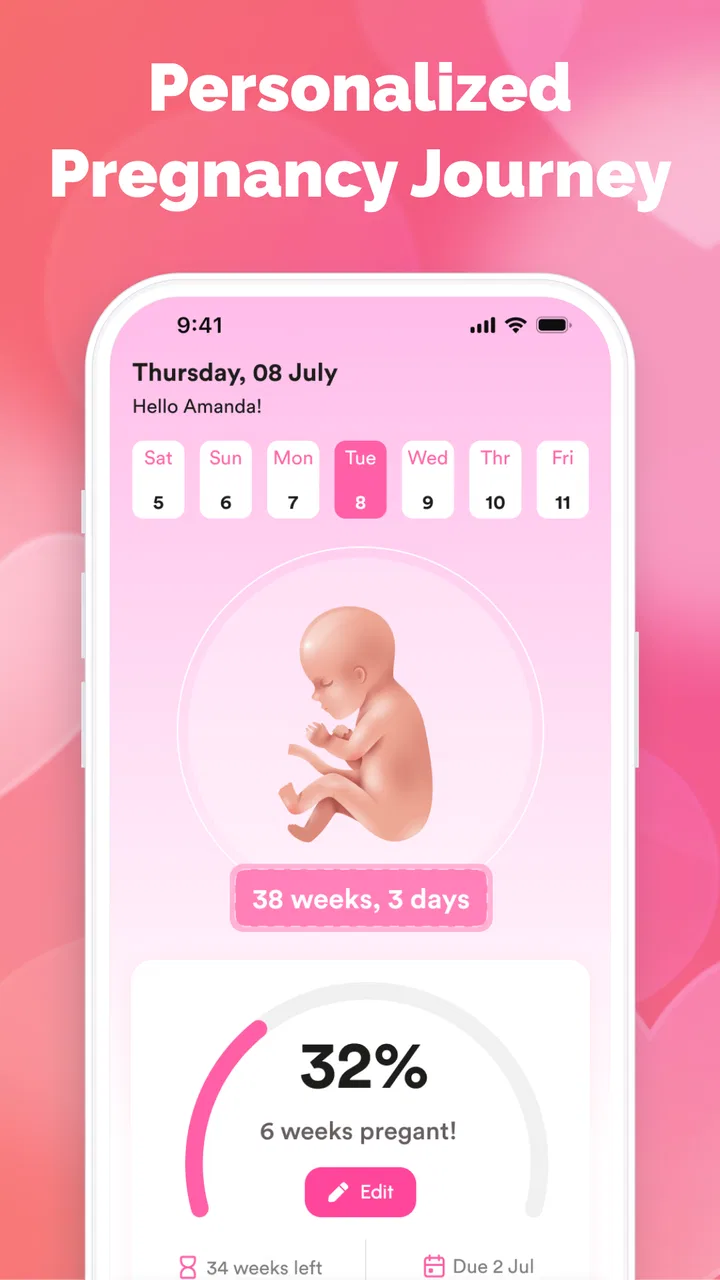
The central appeal is its combination of a pregnancy timeline, baby-growth information organized by week, and a due-date counter. Those three elements work together naturally. Instead of searching separately for the current pregnancy week, a general explanation of fetal development, and a countdown, I can use one small app as a quick reference point.
You May Also Like

 Blood Strike: 2.5 Anniversary
Blood Strike’s Loadouts Turn Every Drop Into a Tactical Gamble
A close look at Blood Strike’s custom loadouts: how fast access to signature weapons reshapes its battle royale rhythm, rewards preparation, and narrows the gap between fights.

 Pandora - Music & Podcasts
Pandora’s Music Is Easy to Start, but Harder to Recover
Pandora’s strength is its low-effort path from a seed to a station. Its weak spot is how much confidence it asks you to place in connection, setup, and quiet recovery.

 8 Ball Pool
 Is Built on Rivalries, Rematches, and Routine
A close look at the rivalries, rematches, shared routines, and unanswered safety questions that turn a quick pool match into a persistent mobile community.

 Samsung Music
’s Quiet Strength Is Playing What You Already Own
Its reach comes less from spectacle than from dependable access to a personal library. That simplicity is both the app’s strongest retention engine and its ceiling.

 AccuWeather: Weather Radar
AccuWeather Review: A Quick, Clear Forecast for Everyday Decisions
For everyday plans, the best forecast is the one you can understand quickly. AccuWeather makes rain timing, radar, and local conditions easy to act on, with a few trade-offs.

 Hill Climb Racing
Why Hill Climb Racing Still Turns Crashes Into One More Run
A tiny car, a bumpy hill and one more upgrade: Hill Climb Racing keeps resurfacing because its simple chaos makes every near-miss feel personal.
More From Our News Desk



That simplicity matters in real life. Pregnancy often brings repeated questions, and not every question requires a long article or a consultation. When I want to check where the pregnancy currently sits in the overall timeline, a focused tracker is faster than opening a general search engine and sorting through conflicting pages. The weekly format also gives the experience a sense of progress, which can make a long pregnancy feel easier to follow.
I found the due-date counter most useful as a planning prompt rather than a promise. It gives the pregnancy a visible target, but a due date is an estimate, not a guaranteed delivery day. I would use the counter to think about appointments, preparation, and conversations with family, while keeping medical decisions in the hands of a qualified professional. That distinction is important because an attractive countdown can feel more exact than pregnancy timing really is.
The weekly baby-growth view is similarly best treated as general education. It can help a parent understand the broad stage of development and give context to conversations with a midwife or doctor. It should not be used to diagnose a concern, replace prenatal care, or decide whether a symptom is serious. The app is a tracking aid, not a medical authority.
What the free access means in practical terms
Because Pregnant Guide is free, the most sensible way to judge its value is by asking whether its core information is useful enough to keep within easy reach. There is no purchase decision to make before trying it, so I would install it, enter the relevant pregnancy details, and see whether the presentation fits my routine. That is a better approach than assuming a free app must be either limited or surprisingly complete.
For someone who only needs a weekly overview and a due-date reminder, free access can be enough value on its own. I would not describe it as a replacement for a paid pregnancy service, because those products may offer broader tools, professional content, or more extensive records. At the same time, paying more does not automatically make a tracker better for a person who wants only a quick progress check.
The important trade-off is that the app’s low barrier to entry does not remove the need to evaluate its usefulness personally. The modest rating suggests that some users have encountered problems or found the experience less satisfying than expected. Since the app is free, the cost of testing it is mainly your time and attention. If the weekly information feels too basic or the interface does not suit you, moving to another tracker is relatively easy.
A realistic morning-to-evening use case
Imagine someone who has just finished a prenatal appointment and wants to explain the current stage of pregnancy to a partner. Rather than passing around a long medical article, they can open the weekly view, look at the baby-growth information, and use the due-date counter as a shared reference. Later that evening, the same person might check the timeline while making a list of questions for the next appointment.
That workflow shows where this app makes sense: short visits, repeated orientation, and shared conversations. It is not necessarily the place I would store every appointment note, symptom, test result, or question. I would use a separate notebook, calendar, or health record for those tasks unless the app clearly supports them in a way that feels reliable. Keeping the tracker focused can actually be a strength, because it prevents a quick check from turning into a complicated data-entry session.
A useful habit is to treat the weekly page as a conversation starter. If something in the development information raises a question, I would write that question down instead of trying to interpret it alone. This turns a passive reading feature into a practical preparation tool for prenatal visits. It also avoids the common mistake of comparing a general description with an individual pregnancy as though every pregnancy follows an identical schedule.
Small workflow choices that improve its usefulness
One non-obvious benefit of a week-based tracker is that it can reduce repeated searching. Search results often mix different ways of counting pregnancy weeks, while a dedicated timeline gives the user one consistent reference inside the app. I would still confirm the starting information carefully, because an incorrect date can make every later week and countdown less helpful.
I would also check the tracker at a fixed moment, such as after a weekly appointment or on the same day each week. That makes the app part of a routine instead of something opened only when anxiety appears. The goal is not to monitor constantly; it is to create a calm, predictable way to orient yourself.
Another useful approach is to compare the app’s general weekly explanation with the information given by your healthcare provider, not with social-media stories or other people’s pregnancies. If the two seem different, the professional guidance should carry more weight. This is especially important when the app’s wording feels broad while your own care plan is tailored to your history.
Finally, I would avoid treating the countdown as a scheduling command. It can help estimate how much preparation time remains, but it should not encourage last-minute planning or create pressure around the exact day shown. A due-date counter is most helpful when it supports preparation without becoming a source of unnecessary worry.
Where the experience may feel limited
The biggest concern is the gap between a focused concept and what some users may expect from a modern pregnancy app. The store summary emphasizes tracking, weekly baby growth, and the due-date counter. That makes the product easy to understand, but it also signals a narrower purpose than a full pregnancy organizer. If I wanted detailed appointment planning, symptom logs, nutrition guidance, contraction timing, birth preparation, or a rich personal journal, I would look carefully at whether this app actually supports those needs before making it my main tool.
The average rating of 2.6 is another reason to keep expectations measured. A rating at that level does not prove that the app will fail on every phone or for every pregnancy, but it does tell me not to recommend it blindly. I would pay attention during the first few sessions to whether the dates are easy to set, whether the weekly information is clear, and whether the navigation feels dependable. Those basic details matter more than a long list of theoretical features.
There is also a difference between information being available and information being sufficiently detailed. A short weekly explanation may be perfect for a user who wants a quick reminder, yet feel inadequate to someone who wants in-depth reading. In that situation, a medical resource or a more comprehensive pregnancy platform would be the better companion, while Pregnant Guide could still serve as a lightweight countdown tool.
I would not use it as the only place for health-related decisions. If I noticed worrying symptoms, changes in movement, unusual pain, bleeding, or any issue that felt urgent, I would contact a healthcare professional rather than searching the tracker for reassurance. That is not a criticism unique to this app; it is a necessary boundary for any general pregnancy guide.
Who is likely to get the most value
I think the strongest audience is a first-time parent who wants a gentle overview without being overwhelmed by a large dashboard. The weekly structure can make the process easier to understand, and the due-date counter gives both partners a shared point of reference. It may also suit someone who already receives detailed medical care but wants a separate, simple way to follow the broader timeline.
It could be useful for a partner or family member who wants to understand the pregnancy’s current stage without reading a full textbook. A quick weekly explanation can make conversations more concrete and help a partner ask better questions. In that role, the app is less about managing care and more about helping another person stay involved.
Users with older Android phones may also appreciate the broad operating-system support, since Android 7.0 is the minimum listed requirement. That does not guarantee identical performance on every device, but it means the app is not restricted to only recent hardware. For someone with a compatible older phone who wants a free tracker, trying it is reasonable.
On the other hand, I would steer away from it if you want a complete pregnancy record, extensive customization, or a highly polished health-management experience. Someone who already relies on a medical app, a clinic portal, or a detailed paid pregnancy service may find this tracker too narrow. It is also not the right choice for anyone looking for individualized medical advice.
How it compares with common alternatives
The usual alternative is a general pregnancy app with many sections: daily articles, checklists, symptom logging, appointment reminders, community discussions, and sometimes shopping or birth-planning tools. Those apps can provide more depth, but they also demand more setup and may present a constant stream of content. Pregnant Guide’s appeal is the opposite approach: keep the focus on the pregnancy week, baby-growth context, and remaining time.
A calendar app is another alternative. A calendar is better for appointments, reminders, and practical preparation, but it usually does not explain baby development by pregnancy week. I would use a calendar for dates that must not be missed and this tracker for a quick educational overview, provided the tracker’s date setup matches my clinical information.
Printed guides and trusted medical websites can offer more detailed explanations than a compact app. Their advantage is depth and the ability to compare topics carefully. Their disadvantage is that they may not provide the same immediate timeline and countdown experience. For me, the best combination would be a simple tracker for orientation and a reliable healthcare source for questions that require nuance.
Paid alternatives should be judged on what they add, not simply on the fact that they cost money. If a paid service offers tools I will genuinely use every week, it may justify its price. If I only want to know the current week and see a broad development overview, paying for a larger package may be unnecessary. Since Pregnant Guide is free, it has a clear advantage for cautious users who want to test a basic workflow first.
My recommendation after weighing the trade-offs
I would recommend trying Pregnant Guide to someone who wants a free, uncomplicated pregnancy timeline and does not need a full health-management system. Its focused design can be useful during quick checks, partner conversations, and weekly preparation. The broad device compatibility and Everyone age classification also make it approachable for a wide range of users.
I would not recommend relying on it as the sole pregnancy resource. The low average rating means I would approach the experience with realistic expectations, and the narrow focus may leave out the tools that some parents consider essential. If the app feels confusing, incomplete, or unreliable during the first few uses, there is little reason to force it into your routine simply because it costs nothing.
My practical verdict is to treat it as a lightweight starting point. Use it to follow the timeline, read the weekly growth information, and keep the due-date estimate visible. Pair it with your healthcare provider’s advice and another method for appointments or personal notes. For a free first step, it is worth testing; for a complete pregnancy-management solution, I would choose a more comprehensive alternative.
That balance is what makes the app easiest to recommend honestly. It can reduce the friction of checking pregnancy progress, especially for people who prefer a small number of clear functions. It is less convincing for users who expect a polished, all-in-one companion. With the right expectations, Pregnant Guide can occupy a useful supporting role without pretending to replace professional care or a more detailed organizer.
In the end, I see Pregnant Guide - Baby Tracker as a practical trial rather than an automatic long-term recommendation. Its free access removes the financial risk, its purpose is easy to understand, and its weekly approach may be exactly what a user wants. The sensible decision is to test the date setup and reading experience, keep the medical boundaries clear, and move on if the limited scope does not match your needs.
FAQs for Pregnant Guide - Baby Tracker
01What is Pregnant Guide - Baby Tracker used for?
Pregnant Guide - Baby Tracker is designed to help expectant parents follow pregnancy progress in a convenient, organized way. It may provide weekly information about fetal development, pregnancy milestones, estimated due-date tracking, reminders, and tools for recording personal notes or symptoms. The app is intended as an informational companion rather than a replacement for regular appointments with a qualified healthcare professional.
02Can Pregnant Guide - Baby Tracker accurately calculate my due date?
The app can generally estimate a due date using information such as the first day of your last menstrual period or another pregnancy date entered during setup. This calculation is only an estimate, because ovulation, cycle length, conception timing, and ultrasound measurements can vary. For the most reliable dating information, compare the app’s result with the due date provided by your doctor or midwife.
03Does the app provide medical advice or replace a doctor?
No. Pregnancy information in Pregnant Guide - Baby Tracker should be treated as general educational guidance, not as a diagnosis or personalized medical recommendation. Every pregnancy is different, and symptoms that appear minor in an app may require professional attention. Contact your healthcare provider for questions about medication, nutrition, test results, complications, or any worrying change in your health.
04What information do I need to enter, and is my data private?
You may be asked to provide details such as your last menstrual period, expected due date, pregnancy stage, symptoms, weight, or personal notes, depending on the features available in your version of the app. Before entering sensitive health information, review the app’s privacy policy, permissions, storage practices, and any options for deleting or exporting your data.
05Is Pregnant Guide - Baby Tracker free to download and use?
The app may be available as a free download, but some features can depend on the version, platform, region, or optional in-app purchases. Check the Google Play Store or Apple App Store listing before installing it to confirm pricing, subscriptions, advertisements, and supported devices. If a trial or subscription is offered, read the renewal and cancellation terms carefully.
Pros
- Simple daily tracking for pregnancy milestones and symptoms.
- Helpful reminders support regular prenatal routines.
- Clear week-by-week information is easy for first-time parents.
- Baby development updates make progress engaging to follow.
- Useful tools can help organize appointments and personal notes.
Cons
- Some features may require payment or include advertising.
- Medical information should not replace advice from a healthcare professional.
- Content may feel limited for users seeking detailed clinical guidance.
- Reminder settings may need manual adjustment to match individual schedules.
- Privacy details should be reviewed before entering sensitive pregnancy data.

Pregnant Guide - Baby Tracker
Gallery